When the agent writes the workflow
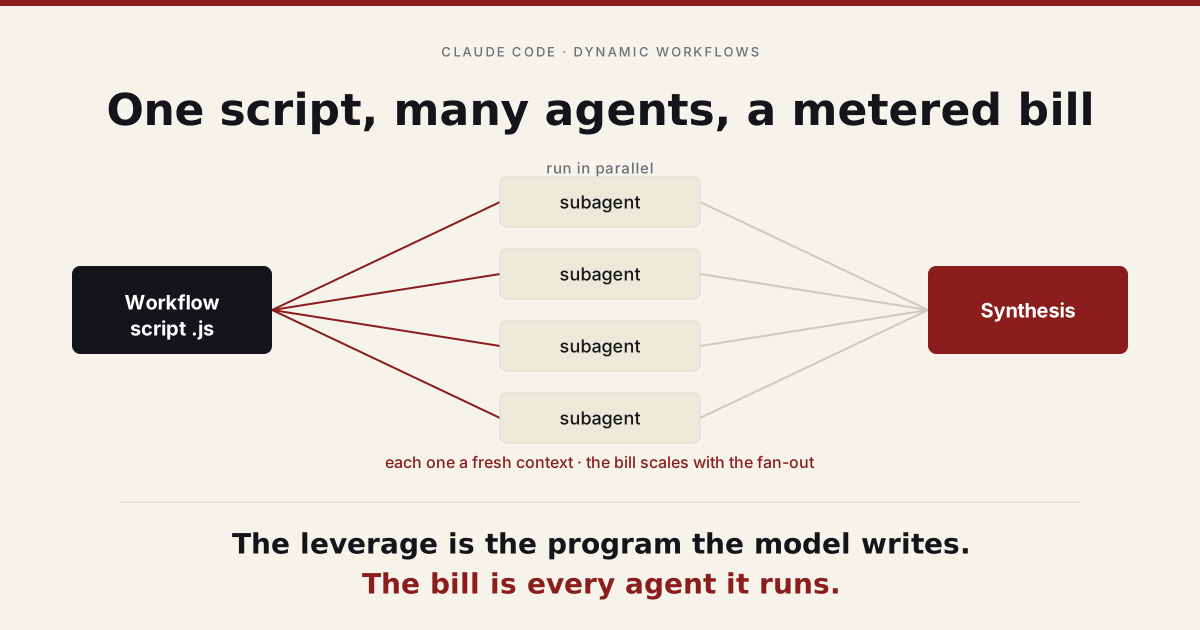
A few days ago I needed to find every place a deprecated API was still being called across a large codebase, and work out what replacing each one would take. The ordinary way to do this is to grep, open the files, and grind through them. I asked Claude Code instead, and it did something I did not expect. It wrote a small JavaScript program. The program split the tree into chunks, spawned a couple of dozen subagents that each searched their slice in parallel, gathered the results into one structured list of call sites, and then ran a second pass where one agent proposed a fix for each site and another checked whether the fix would hold. A couple of minutes later I had a deduplicated list of every call site, each with a proposed change and a flag on how confident the check was.
The interesting part was not the list. It was that the orchestration, the fan-out and the gather and the verify, was a piece of code the model had written on the spot for this one task. I did not ask for a program. I asked it to find some call sites, and the model decided the cleanest way to get there was to author and run a small distributed system.
That is what Claude Code’s dynamic workflows are, and they are worth understanding, because they are a quiet shift in how the model works. Most of the time we use an agent as a worker: it does the task. A workflow uses the agent as an author: it writes the program that coordinates many workers. The program is the artifact, and because it is just code, everything we already know about code applies to it. You can read it, commit it, parameterize it, and run it again next week.
What a workflow actually is
A workflow is a JavaScript file with two parts. It opens with a meta object that names it, and then a body that calls a function named agent(). Each call to agent() spawns a fresh subagent, hands it a prompt, and returns what it produced.
The simplest useful thing you can do is ask an agent for structured data instead of prose. If you pass a JSON schema, the subagent is required to return an object matching it, and the runtime validates the result and retries on a mismatch. You get data, not a paragraph you have to parse.
export const meta = {
  name: "release-notes",
  description: "Turn a raw commit log into categorized release notes",
};

const notes = await agent(
  `Sort these commits into features, fixes, and breaking changes:\n${args.commitLog}`,
  {
    schema: {
      type: "object",
      additionalProperties: false,
      properties: {
        features: { type: "array", items: { type: "string" } },
        fixes: { type: "array", items: { type: "string" } },
        breaking: { type: "array", items: { type: "string" } },
      },
      required: ["features", "fixes", "breaking"],
    },
  },
);

return notes; // a validated object: { features: [...], fixes: [...], breaking: [...] }
The body is ordinary JavaScript. That matters more than it looks. The control flow, the loops and conditionals and the decisions about what to run in parallel, is real code that runs deterministically. The model is not improvising each step at runtime. It decided the shape once, wrote it down, and now the runtime executes it the same way every time. What is not deterministic is what each agent returns, which is why the schema and, as we will see, the verification steps matter.
Fanning out
The reason to reach for a workflow instead of just asking an agent is that the work breaks into pieces that can run at the same time.
parallel() takes a list of functions, runs them concurrently, and waits for all of them to finish before returning. Here it is summarizing a set of files at once, which would be slow and context-hungry to do in a single agent reading them one after another:
const files = args.files; // e.g. ["src/auth.ts", "src/db.ts", "src/cache.ts"]

const summaries = await parallel(
  files.map(
    (path) => () =>
      agent(`Read ${path} and summarize what it does in two sentences.`, {
        label: `summarize:${path}`,
      }),
  ),
);

// summaries[i] lines up with files[i]; an agent that fails comes back as null
return files.map((path, i) => ({ path, summary: summaries[i] }));
Two details worth noting. Each entry in the list is a function that returns the agent call, not the call itself, so parallel() controls when each one starts. And a subagent that dies does not crash the whole run; it resolves to null, so you filter for the survivors rather than wrap everything in try/catch.
parallel() is a barrier: nothing downstream happens until every agent in the batch is done. Often you do not want that. If each item has its own multi-step path, you want each one to flow through all the steps on its own, so a fast item is not stuck waiting on a slow sibling. That is what pipeline() does. Each item runs through every stage independently, and each stage receives the previous stage’s result and the original item.
It is the shape of the audit above, written out as a code review. Each changed file is reviewed, and the moment a file’s review comes back, its findings are sent out to be verified, while other files are still being reviewed:
export const meta = {
  name: "review-diff",
  description: "Review each changed file, then verify each finding",
  phases: [{ title: "Review" }, { title: "Verify" }],
};

const FINDING = {
  type: "object",
  additionalProperties: false,
  properties: { title: { type: "string" }, line: { type: "number" } },
  required: ["title", "line"],
};

const results = await pipeline(
  args.files,
  // stage 1: review a file, return a list of findings
  (path) =>
    agent(`Review ${path} for correctness bugs.`, {
      phase: "Review",
      schema: {
        type: "object",
        additionalProperties: false,
        properties: { findings: { type: "array", items: FINDING } },
        required: ["findings"],
      },
    }),
  // stage 2: verify each finding from that file, in parallel
  (review, path) =>
    parallel(
      review.findings.map(
        (f) => () =>
          agent(`In ${path}, is "${f.title}" at line ${f.line} a real bug? Be skeptical.`, {
            phase: "Verify",
            schema: {
              type: "object",
              additionalProperties: false,
              properties: { real: { type: "boolean" } },
              required: ["real"],
            },
          }).then((verdict) => ({ ...f, path, real: verdict?.real === true })),
      ),
    ),
);

const confirmed = results.flat().filter((f) => f && f.real);
return { confirmed };
There is a concurrency limit underneath all of this, currently around sixteen agents at once, so handing pipeline() a hundred files does not launch a hundred agents; it runs them in waves and they all complete. The phase() labels are just for the progress display, grouping the live agents under “Review” and “Verify” so you can watch the run.
The part that makes it dynamic, and durable
Here is the detail that took me a moment to appreciate. The workflow script is authored at runtime, for the task in front of it, but it is not thrown away. It is written to a file, and the run returns an id.
That means a workflow is a normal software artifact. If a run is useful, you keep the file. If you drop it into your project’s workflow directory, it becomes a named workflow you can invoke by name, the same way you would call any saved command. You can parameterize it through an args value so the same script handles next quarter’s release or a different set of files. And because each completed step is journaled against the run id, you can resume: edit one stage of a long workflow, re-run it, and the unchanged steps before your edit return their cached results instantly while only the edited step and everything after it run again.
// The release-notes script, once saved, is reusable without re-authoring it:
//   Workflow({ name: "release-notes", args: { commitLog } })
//
// Re-run a script you wrote earlier and tweaked:
//   Workflow({ scriptPath: ".../release-notes.js" })
//
// Resume a long run after editing one stage; the cached prefix is skipped:
//   Workflow({ scriptPath, resumeFromRunId: "wf_..." })
The agent’s real leverage is not the task it does. It is the program it writes to run a hundred copies of itself.
This is the shift worth sitting with. A prompt is ephemeral; you run it and it is gone. A workflow is code, so it is versionable, reviewable, and shareable. The orchestration stops being a one-off performance and becomes an asset your team can keep. The model wrote it, but it lands in the same place as everything else you build: in the repository, under review, ready to run again.
What it is good for
Workflows earn their complexity when the work decomposes and benefits from either parallelism or independent checking. A few shapes recur.
Fan-out comprehension, when you need to understand something too big for one context: point many readers at different parts of a codebase and synthesize their reports. Adversarial verification, when a plausible-but-wrong answer is dangerous: spawn several skeptics per finding and keep only the findings a majority cannot refute. Loop-until-dry, when you do not know how much there is to find: keep running finders until a few rounds in a row turn up nothing new. Judge panels, when the solution space is wide: generate several independent attempts, score them, and synthesize from the best.
The common thread is that one agent in one context cannot do the job as well, either because the job is too large to fit or because a single pass has no second opinion. When that is not true, a workflow is the wrong tool. For a single lookup, a linear task, or anything a lone agent handles in one pass, the orchestration is pure overhead. Reach for the cheapest structure that answers the question.
What it costs
Now the half of this that the demos leave out.
Every subagent runs in its own fresh context. It does not share the orchestrator’s history; it gets its own prompt, does its work, and returns. That isolation is what makes the parallelism clean, and it is also where the cost lives. A ten-agent fan-out is, very roughly, ten times the tokens of a single call, plus the orchestrator that launched them and the synthesis that pulls them together. A workflow that loops, or fans out and then verifies each result with three more agents, multiplies quickly. The pipeline above, on a forty-file diff that averages three findings each, is well over a hundred agent invocations.
The runtime gives you a few guard rails. There is a hard ceiling on how many agents a single workflow can ever spawn, currently a thousand, which exists to stop a runaway loop rather than as a number you should approach. And there is a budget you can read inside the script, so a workflow can scale its own depth to a token target and stop when it gets close:
const bugs = [];
while (budget.total && budget.remaining() > 50_000) {
  const round = await agent("Find one bug we have not already listed.", {
    schema: {
      type: "object",
      additionalProperties: false,
      properties: { bugs: { type: "array", items: { type: "string" } } },
      required: ["bugs"],
    },
  });
  bugs.push(...round.bugs);
  log(`${bugs.length} found, ${Math.round(budget.remaining() / 1000)}k tokens left`);
}
return bugs;
The guard on budget.total matters: with no target set, remaining() is infinite, and the loop would run straight into that thousand-agent ceiling. The cost is also why the runtime cares about its prompt cache, which expires after about five minutes. A workflow that sleeps for an hour and resumes pays to re-read its context cold. None of this is a reason to avoid workflows. It is a reason to know the bill before you run one.
This is the same shape as a pattern worth watching across AI generally. The leverage is real and the leverage is metered. A workflow buys you quality and wall-clock time, two things that used to require more people, and it pays for both by the token. Treated carelessly, fan-out is the easiest way to turn a five-cent question into a five-dollar one.
Where this points
It is tempting to file dynamic workflows under tooling, a convenience for people who use Claude Code. I think they are a small instance of a larger thing. The capability that matters here is not in any single model call. It is in the orchestration the model writes around its own calls, the program that decides what runs in parallel, what gets verified, what loops until it is done. That program is ordinary code, which means it can be committed, audited, and reused like anything else your team builds. I have argued before that the frontier of AI moved out of the model and into the architecture around it. A workflow is that idea you can hold in your hand: the model’s leverage, written down as a file, with a price tag attached.
The skill this rewards is no longer just writing a good prompt. It is knowing when a task is worth having the model write the program that runs a hundred prompts, and when that program is worth keeping, and when the answer it buys is worth the bill.